


I will open with the part that most people care about the most, this is only for the VISIBLE watermarks. The embedded, machine-readable, often invisible, watermarks will still be there. Meaning that platforms will still be able to tell that the output was generated with AI tools.
With that out of the way, the process is straightforward -
- Go to gemini.google.com
- Open the settings menu by clicking on the gear in the bottom left
- Hover the mouse over “Media watermark”
- Select Off
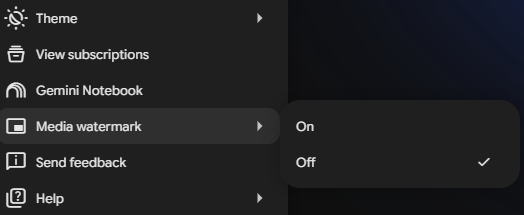
- Gemini should no longer add watermarks to images, video, or music output
A few things worth noting -
- This is only available on the desktop, not on phones
- In some locations, you must have an AI Ultra account to see this setting
Watch a Demo:

One More Google AI Feature?
Keeping up with AI updates is practically a full-time job. We'll help you focus on the features that actually make a difference.
Comments