


AI tools don’t only have to be used for work efficiency. You’ll probably use the tools more overall if you find some good use-cases in your personal life.
I like this example since it involves food and we all gotta eat.
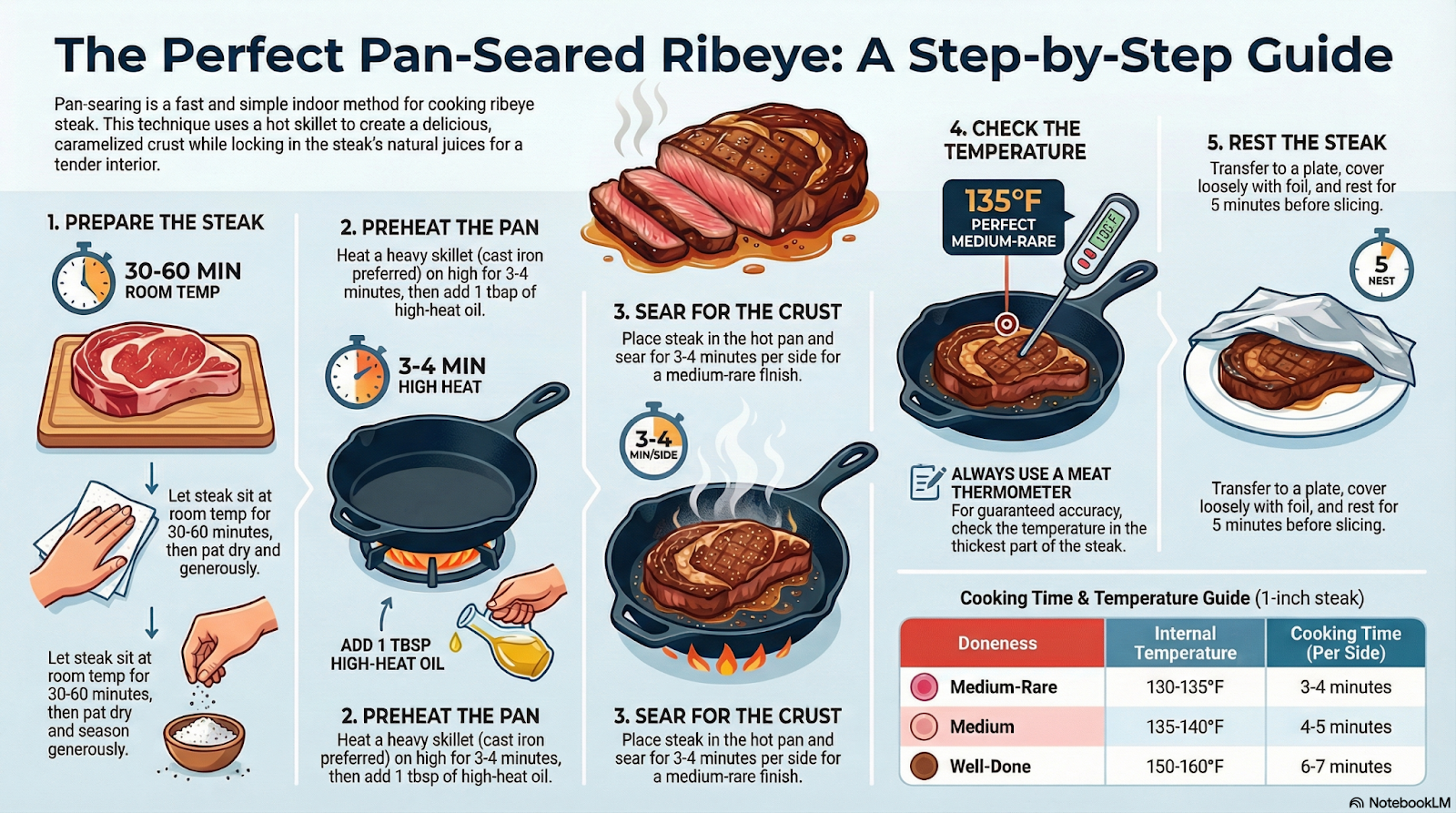
Basically, you add your recipe(s) to NotebookLM and then prompt it to create one or more infographics. The infographics are usually easier to follow than pages and pages of recipe instructions. Also easier than trying to read someone’s bad handwriting on a grease-covered index card while your food is burning (we’ve all been there).
You can watch here or read the process below:
Here’s the full process -
- Go to notebooklm.google.com
- Either create a new notebook or open an existing notebook
- Add a source that contains the recipe
- This can be a website, a picture from a cookbook, a scan of a handwritten note, etc.
- Click on the pencil next to “Infographic”
- Type in your instructions
- Usually something like “Create an infographic that can be followed when preparing {dish]”
- Wait for the infographic to generate
- Review the infographic
- If it’s good then you are done
- If it isn’t good then discard and try again with a different/better prompt
Here is the infographic output that I got to make a pan-seared ribeye
Ready to Use AI for Real Work (Not Just Recipes)?
Next-Level AI Workshops help you build systems, workflows, and habits that actually stick.
Comments