


Here’s how -
- Go to notebook.google.com
- Open the notebook that you want to copy
- Click on the “more options” menu (vertical ellipsis in the upper right corner)
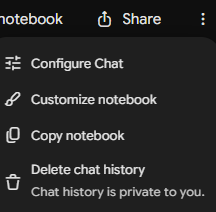
- Select Copy notebook
- A private copy of the notebook will be added under “My notebooks”
- Its name will be Copy of <original notebook name>
- If my original notebook was named Cookies, the copy would be named Copy of Cookies
- Its name will be Copy of <original notebook name>
Things to note -
- The sources will be copied to the new notebook
- The studio contents (artifacts) will be copied
- Chat history will not be copied
- Notes will not be copied
Watch a demo:

Master Gemini Notebook, Not Just the Updates
Features come and go. Learn the workflows that make Gemini Notebook one of the most useful AI tools you'll use. Join our next live cohort.
Comments