

.png)
Answering your questions about business and technology
Question
Can I create video shorts in NotebookLM (YouTube short or TikTok style)?
~ Hunter
Answer
Hi Hunter,
The short answer (see what just happened) is yes.
It is a fairly new feature but they just added it to free accounts so you should be able to use it regardless of the type of account that you have..
Here is what you’ll have to do -
-
- Go to notebook.google.com
- Create a new notebook or go into one that you already have created and want to use
- Make sure you have at least one source that you want to use for your video
- Find Video Overview in the Studio panel on the right
- Click on the arrow on the right side of the Video Overview button
- This will open the Customize Video Overview window
- Click on the Short option under Format
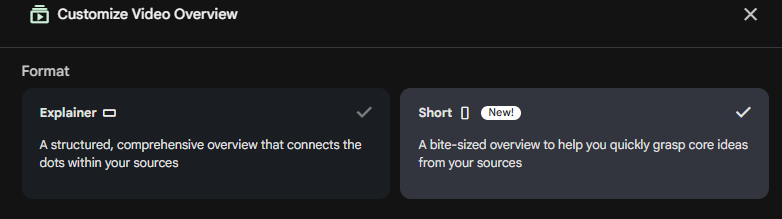
-
- Select or type in a topic for your video
- Click Generate
You could also prompt it from the Chat section but that isn’t as straightforward so we’d recommend using the above process the first few times.
The videos can take a while to generate so you might not want to sit and wait for this to finish. It will work in the background while you do something else in Gemini Notebook (they changed the name from NotebookLM recently) or in another program.
Hope that helps.
~ Damien
Watch the Video Demo:

Still Reading? You’re Probably Into This.
Get one email per week with useful tips like this.
Comments