

.png)
Answering your questions about business and technology
Question
When I go into Google Gemini’s model picker, I have 3 options - Fast, Thinking, and Pro. It used to be Fast and Thinking. Which one should I use?
~ Anonymous
Answer
Hi,
They really are doing a good job of making this confusing, aren’t they? I’m not sure that I can untangle this for you but I will try…
Since they have been changing things so often, and I want to make sure we are on the same page, here is a screenshot of my model picker today:
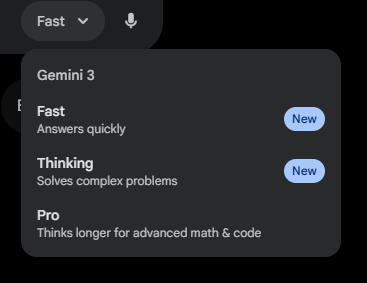
If yours doesn’t look like this anymore then the rest of this is likely outdated already.
The short answer to your question is to use Fast. If you don’t get good output with fast (and you’ve checked your prompt for clarity, context, etc.), then switch to thinking. Most people only need to use Pro for images (since that is the model that must be selected to use Nano Banana Pro).
(Here’s where it gets more confusing)
Gemini is using two different models - “gemini-3-flash-preview” and “gemini-3-pro-preview”.
“Fast” is gemini-3-flash-preview with the thinking level set to minimal
“Thinking” is gemini-3-flash-preview with the thinking level set to high
“Pro” is gemini-3-pro-preview with the thinking level set to high
-
- Before the last change, this model and setting were under “Thinking”
You probably don’t care about the section above so don’t spend too much time trying to make it make sense…
To close this out, here are reasons to use each model -
-
- Fast
- You will get output the fastest
- You can enter more prompts with this model each day
- It’s the default so you don’t have to change anything
- It is the best choice for most people, most of the time
- Thinking
- You tried fast and the output wasn’t great
- Your prompt has multiple tasks
- Your prompt requires the model to use math, logic, and/or code
- Pro
- You want to use Nano Banana Pro (images)
- You tried Thinking and it couldn’t handle your request
- Fast
*Note - Since Pro is the most expensive model to run, you will almost always hit your limit with that sooner
Hope that helps.
~ Damien
Ready to Use AI for Real Work (Not Just Experiments)?
Next-Level AI Workshops help you build systems, workflows, and habits that actually stick.
Comments