
<div class="statcounter"><a title="Web Analytics" href="https://statcounter.com/" target="_blank"><img class="statcounter" src="https://c.statcounter.com/12795394/0/d64e9537/1/" alt="Web Analytics" referrerPolicy="no-referrer-when-downgrade">

AI Quick Tips 355: Have you been waiting for this update too?

A graphic title card on a dark blue background. On the left is an orange robot head with a speech bubble containing the text 'AI'. To the right is a light blue circle containing the words 'Quick Tips'.

If you have access to Gemini Pro (app) through a Google Workspace account, chances are you haven’t been able to delete chats for over a year (or ever…)

They have recently updated that (for me at least).


Now it works the same way as other Gemini accounts -

  1. Go to Gemini app @ gemini.google.com
  2. Log in (if you aren’t already logged in to Google something)
  3. Expand the left sidebar
  4. Click on the vertical ellipsis next to a recent chat

    Screenshot of the Gemini application sidebar under Recents, highlighting a chat titled "AI Image Origin Verified by C2PA" with a vertical ellipsis icon on the right.

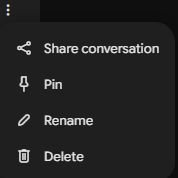
  1. Select delete from the menu
     Screenshot of an active menu dropdown inside the Gemini app, showing text options for "Share conversation", "Pin", "Rename", and "Delete".

Nothing complicated. The issue has been that the option wasn’t there before…


Enjoy deleting all those old chats



Watch a video demo:

 
Blog Subscription Page Icon

New Here?

Don't miss out on these AI Quick Tips.

Comments

Related posts