


Google is showing their advantages in the AI race by integrating AI tools into their already massive product list. This time, it is another Gemini feature within Google Docs.
If you click on Tools, then Audio, you’ll have an option to “Listen to document summary”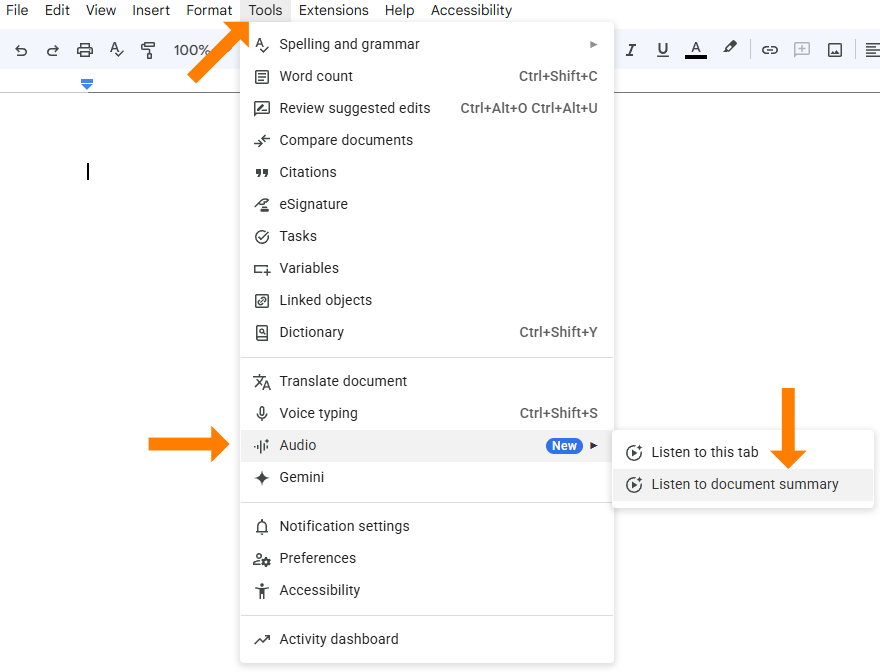
If you used NotebookLM’s audio overviews in the early days then this is pretty similar.
If you think about all of the things that you can put into a Doc, the possibilities are almost endless. If you are drawing a blank on how this could be useful, I’ll give you some examples -
- Open a book in Docs and get a summary before you read through hundreds of pages
- Get a transcription of your last Zoom meeting, put it in Docs, and get a summary to see if you need to watch the entire 2 hours
- Get summaries of long, multi-page Docs that you create to make sure that it sends the message(s) that you intended
- Etc.
As you can see above, there is also an option under the same menu to listen to the tab. So, in practice, if you listen to the summary and you are still interested in the entire Doc, you can listen to it instead of reading if that is your preference.
See a demo of this:

Less AI Friction, More Results
Fix the “why is this not working?” problem and start getting consistent outputs.
Comments