

A few months ago, Google created a Gemini interface in Drive that was part Gemini app and part NotebookLM. At the time it was only available on the web. Not anymore…
In case you aren’t familiar, this is what the interface looks like (the web interface) -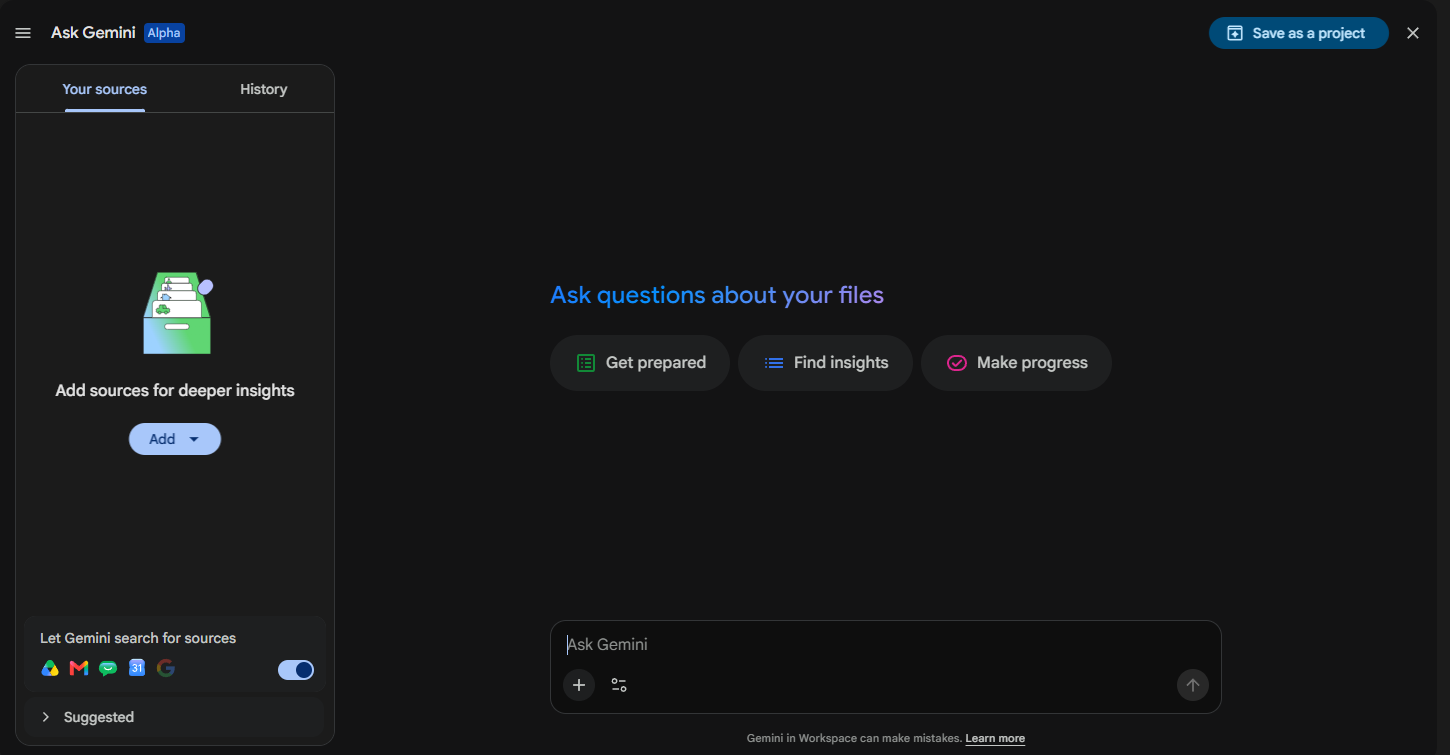
The right side of the interface looks and feels like Gemini app. You can ask questions, use tools, etc (it doesn’t have things like canvas, yet). And the left side lets you add sources from your Drive. You can also get sources from other linked Google products like -
- Chat
- Calendar
- Search
Each can be turned on or off.
The interface is useful but it can be redundant if you are a heavy Google product user. Gemini app already connects to Drive. NotebookLM already connects to Drive. This is a combination of those two within Drive so you may not need all 3.
My guess is that Google will leave them all in place for a while and then get rid of the least used one.
Who knows. The main bullet point here is that this interface is now available in mobile.
Enjoy!
Watch a Demo:
.png?width=600&height=496&name=Next-Level%20AI%20Workshops%20(2000%20x%201000%20px).png)
One More Google AI Feature?
Keeping up with AI updates is practically a full-time job. We'll help you focus on the features that actually make a difference.
Comments